On this page
Kafka is a replicated log, not a promise that every business effect happens exactly once. It gives strong building blocks—ordered partition logs, offsets, consumer groups, replication, and an idempotent producer—but application correctness still depends on keys, transaction boundaries, duplicate handling, retry policy, and dead-letter operations.
I tested those boundaries with a three-partition orders.v1 topic, a Spring Boot producer, two consumer instances, PostgreSQL projection tables, bounded retries, and orders.v1-dlt. The experiment sent ordered events, duplicated one event, injected one permanent failure, and added a second consumer while traffic continued.
The final evidence was:
| Scenario | Observed result |
|---|---|
Five events for order-a | last_sequence=5, applied_events=5 |
Same event_id for order-b sent twice | One database effect |
Six events for order-c while consumer group changed | last_sequence=6, applied_events=6 |
| Permanent poison event | One record in orders.v1-dlt after bounded retries |
| Consumer group after settling | Zero lag on partitions containing records |
That result demonstrates a design under controlled failure. It does not turn Kafka into an exactly-once database.
Ordering exists inside one partition
A Kafka topic is divided into partition logs. Records in one partition have monotonically increasing offsets. Kafka does not define a single total order across all partitions.
For an order workflow, the producer key is the aggregate identifier:
kafkaTemplate.send(
        "orders.v1",
        event.orderId(),
        serializedEvent
);
Records with the same key are assigned to the same partition under a stable partitioning scheme, so order-a events can be consumed in partition order. Different orders can proceed in parallel.
This leads to several operational consequences:
- A hot key cannot be parallelized across consumers without changing the domain model.
- Increasing the topic’s partition count can change key-to-partition mapping for new records.
- Ordering is lost if a retry design republishes failed events to an unrelated topic and later merges them without sequence checks.
- The consumer should persist an aggregate sequence when missing or stale transitions would be dangerous.
“Kafka preserves order” is incomplete. The useful statement is “Kafka preserves record order within a partition, and this producer deliberately maps one aggregate to one partition.”
Producer idempotence is necessary but not end-to-end idempotence
The producer configuration is:
spring:
  kafka:
    producer:
      acks: all
      retries: 2147483647
      properties:
        enable.idempotence: true
        max.in.flight.requests.per.connection: 5
      key-serializer: org.apache.kafka.common.serialization.StringSerializer
      value-serializer: org.apache.kafka.common.serialization.StringSerializer
acks=all waits for the configured in-sync replica acknowledgement. Idempotence lets the broker deduplicate producer retries within the producer session and preserves ordering under the supported in-flight limit.
It does not deduplicate:
- an HTTP caller submitting the same business command twice;
- an application publishing the same event ID in two separate calls;
- a consumer replay after its process crashes;
- an external side effect such as a payment or email.
The experiment proves this by publishing the same order-b event twice. Both records may exist in Kafka. The database projection applies the event once because event_id is unique.
Put consumer idempotency in the same database transaction
The consumer inserts a processed-event marker and updates its read model in one PostgreSQL transaction:
@Transactional
public boolean apply(
        OrderEvent event,
        int partition,
        long offset
) {
    int inserted = jdbc.sql("""
        INSERT INTO processed_events(
            event_id, order_id, sequence,
            partition_id, partition_offset
        )
        VALUES (?, ?, ?, ?, ?)
        ON CONFLICT DO NOTHING
        """)
        .params(
            event.eventId(), event.orderId(), event.sequence(),
            partition, offset
        )
        .update();

    if (inserted == 0) return false;

    jdbc.sql("""
        INSERT INTO order_projection(
            order_id, last_sequence, applied_events
        )
        VALUES (?, ?, 1)
        ON CONFLICT (order_id) DO UPDATE
        SET last_sequence = EXCLUDED.last_sequence,
            applied_events = order_projection.applied_events + 1,
            updated_at = now()
        """)
        .params(event.orderId(), event.sequence())
        .update();

    return true;
}
The listener uses record acknowledgement. If the database transaction commits but the process dies before Kafka commits the offset, Kafka delivers the record again. The duplicate insert does nothing, so the read model does not receive a second effect.
This pattern requires marker retention to match replay expectations. Deleting processed_events after seven days while retaining Kafka data for thirty days makes an older replay unsafe.
For a strict state machine, I would also reject a sequence that is not exactly the expected successor. Kafka partition order reduces out-of-order delivery; it does not validate the domain transition.
Rebalance changes ownership, not record identity
Consumer-group members divide partitions among themselves. When a member joins, leaves, stalls beyond its liveness interval, or subscriptions change, Kafka reassigns partitions.
The lab starts one consumer container, publishes records, then scales to two containers and publishes the order-c sequence. Each application instance configures listener concurrency three, so six consumer threads compete for three partitions. Only three can own work; extra consumers are idle.
That is a useful capacity rule:
maximum active consumers in one group for one topic
  <= number of assigned partitions
More consumer processes do not create more parallelism after every partition has an owner. They may improve failover, but they also increase group coordination and resource cost.
During reassignment, a record can be processed and then redelivered if its effect completes before its offset is committed. The database idempotency key makes that replay safe. Long processing should also use realistic poll, heartbeat, batch, and timeout settings; otherwise the consumer can trigger avoidable rebalances.
Bound retries and separate permanent failures
The listener error handler uses two 500 ms retries, then publishes the record to a matching partition in orders.v1-dlt:
@Bean
CommonErrorHandler orderErrorHandler(
        KafkaTemplate<String, String> template
) {
    DeadLetterPublishingRecoverer recoverer =
        new DeadLetterPublishingRecoverer(
            template,
            (record, error) -> new TopicPartition(
                "orders.v1-dlt", record.partition())
        );

    return new DefaultErrorHandler(
        recoverer,
        new FixedBackOff(500L, 2L)
    );
}
Infinite retry on a poison record blocks its partition and every later record behind it. Immediate dead-lettering treats transient network failure as permanent. Bounded retry makes the decision explicit.
The DLT is not a trash can. It needs:
- the original topic, partition, offset, key, timestamp, and failure class;
- an alert on arrival and growth;
- an owner who can distinguish bad data from a code or dependency failure;
- a replay tool that preserves idempotency and ordering decisions;
- retention long enough for the response process;
- access control because failed payloads can still contain sensitive data.
If later events depend on the failed one, continuing after dead-lettering can create a domain gap. The correct choice may be to stop that key, quarantine the aggregate, or make the projection sequence-aware.
Inspect both the log and the effect
The Kafka UI showed 14 input records and one dead-letter record across three partitions:
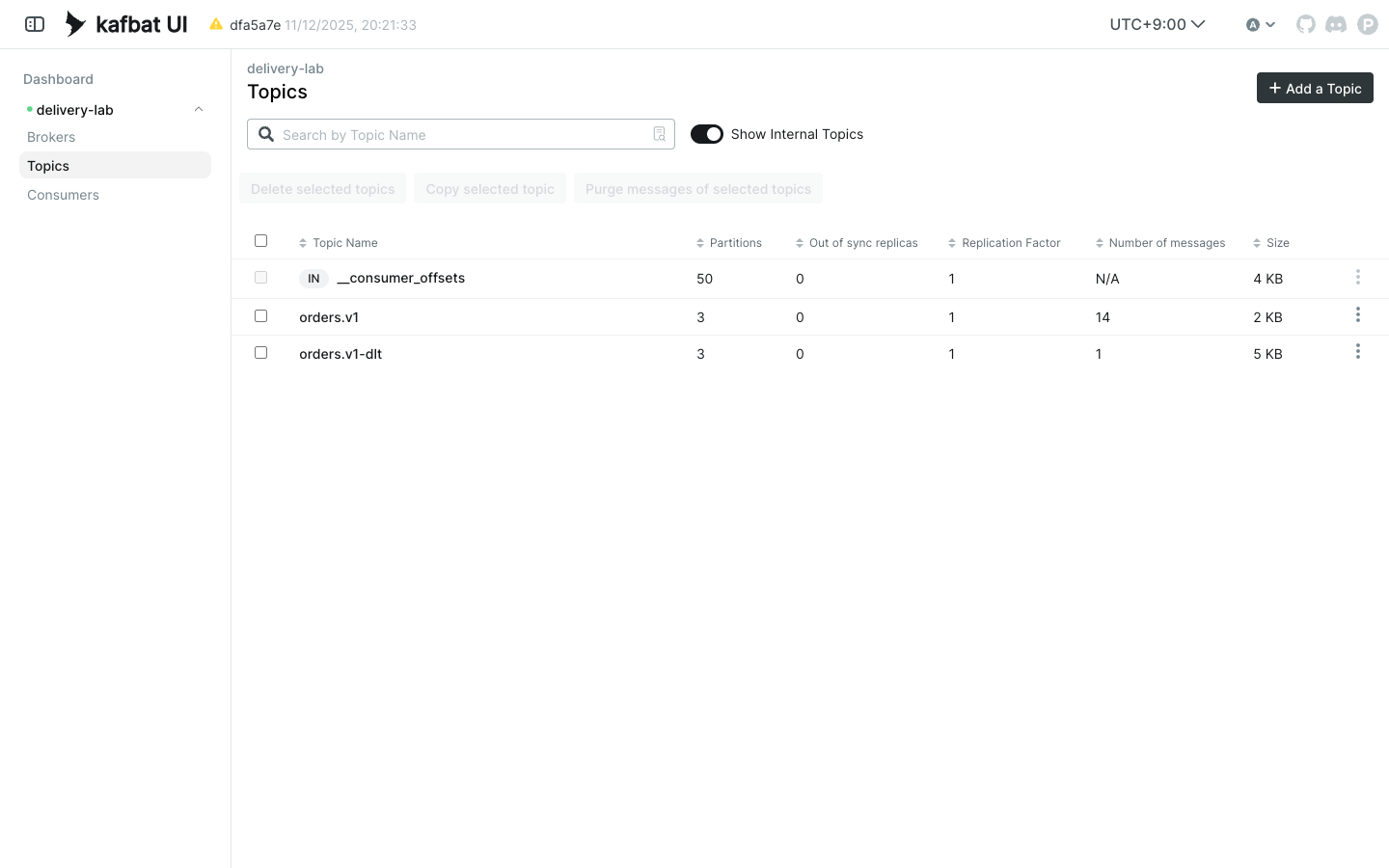
The 14 records break down as five order-a events, two copies of one order-b event, one poison event, and six order-c events. The PostgreSQL artifact is equally important:
{
  "processed": [
    {"order_id":"order-a","last_sequence":5,"applied_events":5},
    {"order_id":"order-b","last_sequence":1,"applied_events":1},
    {"order_id":"order-c","last_sequence":6,"applied_events":6}
  ],
  "dltRecords": 1
}
Broker message count alone cannot prove a correct business effect. Database state alone cannot show backlog or poison records. The operating view needs both.
Useful metrics include:
- consumer lag and oldest unprocessed record age;
- rebalance count and duration;
- processing latency and failure rate by bounded exception category;
- retry and DLT rates;
- duplicate-event count;
- producer send latency and error rate;
- under-replicated or offline partitions.
Serialization is a contract
The lab serializes the event to JSON explicitly and sends a string. That avoided an accidental dependency on an optional Jackson serializer and made the wire payload visible in tests.
A production event needs more than a Java record:
public record OrderEvent(
    UUID eventId,
    String orderId,
    int sequence,
    boolean failAlways
) {}
Define schema ownership, compatibility rules, required fields, default behavior, and how consumers handle unknown versions. Avoid publishing internal entity shapes. Whether the registry uses Avro, Protobuf, or JSON Schema, compatibility should be checked before deployment.
What the guarantees really are
| Layer | Guarantee used here | What it does not guarantee |
|---|---|---|
| Partition | Ordered offsets | Global topic order |
| Key | Same aggregate routes together under stable partitioning | Ordering after careless repartitioning |
| Idempotent producer | Deduplicates producer retries in its session | Business-command or consumer deduplication |
| Consumer group | One partition owner per group assignment | Exactly one external side effect |
| Database event key | One projection effect per event ID | Correct domain order by itself |
| Bounded retry + DLT | Poison record stops blocking forever | Safe continuation or automatic repair |
My practical Kafka checklist is now:
- Choose a key from the ordering boundary.
- Size partitions from required parallelism and future cost, not fashion.
- Enable appropriate producer durability and idempotence.
- Make consumer effects transactional and idempotent.
- Test a crash after the effect but before offset commit.
- Add a consumer during traffic and observe the rebalance.
- Bound retries and operate the DLT as a queue with an owner.
- Version the event schema independently of application entities.
- Alert on lag age, failures, duplicates, and DLT growth.
- State the guarantee precisely; do not write “exactly once” without naming the boundary.
The Kafka design documentation describes the log, replication, and delivery model, while the Spring for Apache Kafka reference documents listener containers, error handling, transactions, and dead-letter recovery.