On this page
An echo server proves that a WebSocket frame can travel through one process. It does not answer the questions that make chat reliable: who authenticated the connection, whether an Origin is allowed, what happens when the sender and receiver reach different instances, when a message is acknowledged, how duplicates are handled, and what happens when a client cannot drain its socket.
I built a synthetic healthcare chat experiment with two application instances behind Nginx, Redis Streams for durable message records, Redis Pub/Sub for live cross-instance fan-out, message-ID deduplication, bounded payloads and rates, slow-consumer protection, and Prometheus metrics. The payloads are synthetic and contain no protected health information.
The integration check connects a sender directly to instance A and a receiver directly to instance B. It proves the message crosses the shared Redis path and that resending the same message ID does not append or broadcast it twice.
WebSocket changes the session, not all of HTTP
WebSocket begins as an HTTP Upgrade request and then becomes a persistent full-duplex connection. The server can send frames without waiting for a new request.
That does not mean ordinary HTTP or gRPC creates a new TCP connection for every request. HTTP keep-alive reuses connections, and HTTP/2 multiplexes streams; gRPC commonly runs on long-lived HTTP/2 connections. The distinctive WebSocket concern is the application session attached to a bidirectional socket.
Long-lived sessions change the operating model:
- deploys and load-balancer timeouts disconnect clients;
- authentication can expire while the connection remains open;
- each instance holds connection state;
- slow readers accumulate buffered data;
- reconnects and duplicate sends are normal;
- cross-instance delivery needs shared infrastructure.
The measured architecture
The local topology is:
browser / test clients
          |
      Nginx :18060
       /          \
  app-a :8080   app-b :8080
       \          /
        Redis :6379
       /          \
 Streams       Pub/Sub
 durable log   live fan-out
Nginx uses WebSocket Upgrade forwarding and balances new connections. Existing WebSocket connections stay on the instance that accepted them, so sticky sessions do not solve cross-instance messaging. The shared channel does.
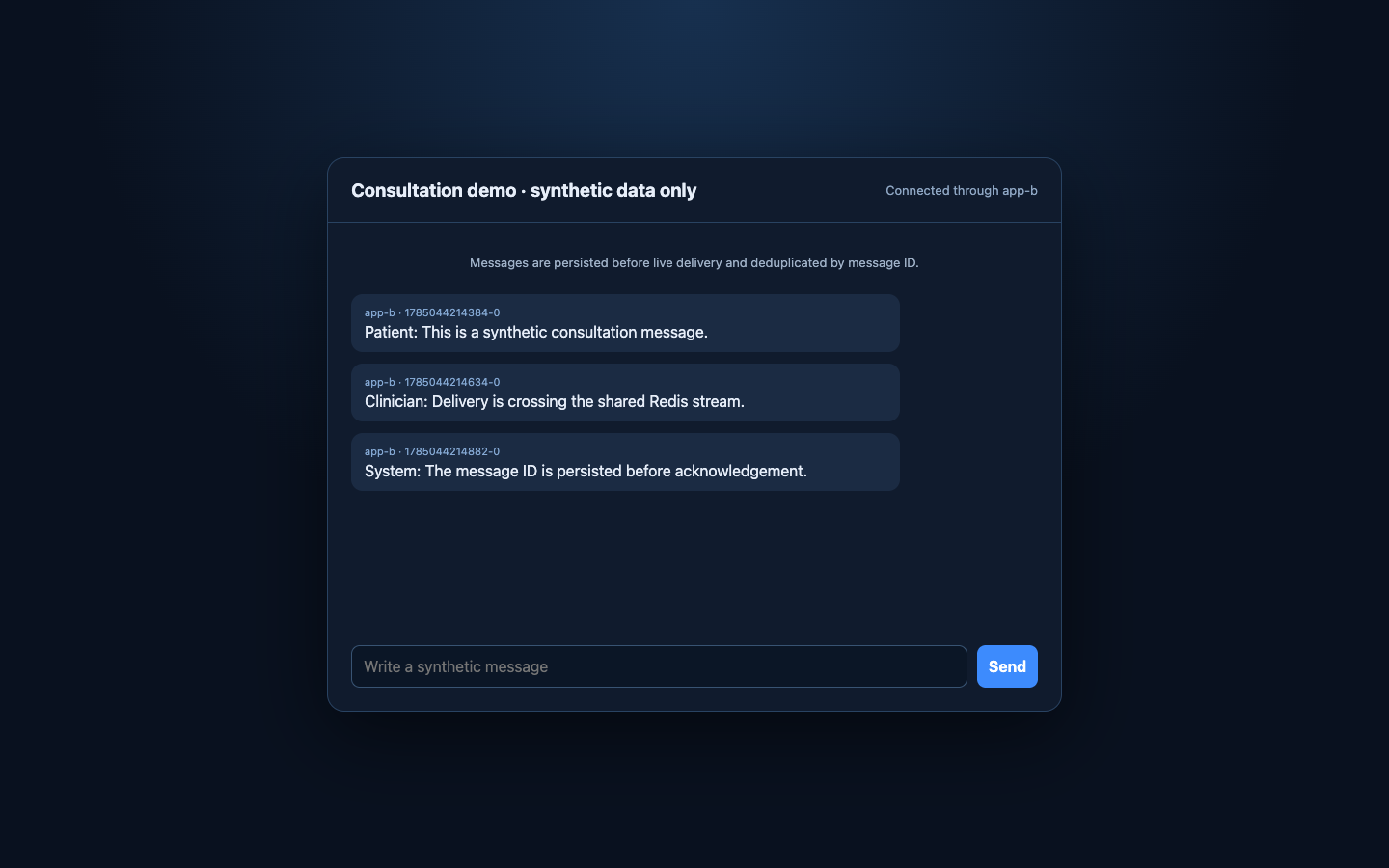
The browser UI shows which instance accepted the connection and the Redis stream ID assigned before acknowledgement:
Authenticate before accepting application messages
The lab requires the first frame within five seconds:
{
  "type": "authenticate",
  "token": "local-lab-token",
  "consultationId": "demo-consultation"
}
An invalid or missing authentication frame closes the socket with policy code 1008. The consultation ID is syntax-validated and bounded before it becomes part of a Redis key.
The first-frame mechanism keeps the experiment small. In production, authenticate during the HTTP handshake when possible, use a secure cookie or supported subprotocol rather than a token in the URL, validate consultation membership server-side, and bind the session to a short-lived identity. Query-string tokens leak into logs and histories.
Authorization is not complete at connection time. Membership can be revoked, a token can expire, and each message type can require a different permission. Long-lived sessions need revalidation or bounded lifetime.
Validate Origin separately from authentication
Browsers send an Origin header during the handshake. The server allows exactly the expected site origin and rejects other upgrades with HTTP 403:
server.on('upgrade', (request, socket, head) => {
  if (
    request.url !== '/ws' ||
    request.headers.origin !== allowedOrigin
  ) {
    socket.write(
      'HTTP/1.1 403 Forbidden\r\n' +
      'Connection: close\r\n\r\n'
    );
    socket.destroy();
    return;
  }

  websocketServer.handleUpgrade(
    request, socket, head,
    ws => websocketServer.emit('connection', ws)
  );
});
Origin validation reduces cross-site WebSocket hijacking risk. It is not identity; non-browser clients can choose their headers. Keep authentication and authorization independent.
Avoid setAllowedOrigins("*") on an authenticated WebSocket endpoint. Use the exact production origins and test rejection.
Persist before acknowledging
The message path is:
client frame
  -> parse, size, schema, rate, and authorization checks
  -> claim message ID with SET NX
  -> XADD to consultation stream
  -> PUBLISH live event
  -> send acknowledgement to sender
  -> every subscribed instance forwards to local sockets
The critical code is:
const duplicateKey =
  `consultation:${consultationId}:message:${message.messageId}`;

const firstSeen = await redis.set(
  duplicateKey, '1', { NX: true, EX: 300 }
);

if (!firstSeen) {
  socket.send(JSON.stringify({
    type: 'ack',
    messageId: message.messageId,
    duplicate: true
  }));
  return;
}

const streamId = await redis.xAdd(
  `consultation:${consultationId}:messages`,
  '*',
  {
    messageId: message.messageId,
    text: message.text,
    instanceId
  }
);

await redis.publish(channel, liveEvent);
socket.send(JSON.stringify({
  type: 'ack', messageId, streamId, duplicate: false
}));
The client receives success only after the durable stream append. Pub/Sub is for low-latency fan-out, not durability. A subscriber disconnected at publish time misses that notification and must recover from the stream.
There is still a failure boundary between XADD and PUBLISH: a process can persist the message and die before live fan-out. A production system needs a stream-driven dispatcher or recovery scan so durable-but-unpublished messages are eventually delivered. The compact lab demonstrates the boundary rather than claiming to eliminate it.
Make client retries idempotent
Mobile networks disappear. A client can send a message, lose the acknowledgement, reconnect, and send again. Every client message therefore carries a stable messageId.
The Redis SET NX marker prevents a second stream append and returns an acknowledgement marked duplicate. The integration test sends the same ID twice and verifies one delivery.
The five-minute marker TTL is sufficient only for this lab. Production deduplication retention must cover the longest retry and offline window, or uniqueness must be durable in the message store. A database unique key or stream-side index can provide a longer boundary.
Backpressure must have a policy
socket.send() does not mean the peer consumed the data. If the client is slow, the server-side buffered amount grows.
The experiment closes a socket with 1013 when its buffered amount exceeds 64 KiB:
if (session.socket.bufferedAmount > 65_536) {
  rejected.inc({
    instance: instanceId,
    reason: 'slow_consumer'
  });
  session.socket.close(1013, 'consumer is too slow');
  continue;
}
The client can reconnect and resume from a durable cursor. Keeping an unlimited buffer would turn one slow or abandoned connection into a memory leak.
Other bounded inputs are equally important:
| Boundary | Lab policy |
|---|---|
| Frame size | Maximum 4 KiB; close 1009 when exceeded |
| Text length | Maximum 1,000 characters |
| Send rate | Maximum 10 messages/s per connection |
| Authentication delay | First frame within 5 s |
| Buffered outbound data | Close at 64 KiB with 1013 |
| Invalid schema or policy | Close with 1008 |
Per-connection rate limiting is not enough for abuse prevention. Production also needs account, consultation, tenant, and IP-aware limits at an appropriate shared boundary.
Scale-out needs a reconnect protocol
Redis Pub/Sub forwards live events to both app instances. Each instance sends only to its local authenticated sessions for that consultation.
When a client reconnects, it should provide its last durable stream ID. The server can read messages after that cursor, deliver the gap, and then resume live subscription. The browser in this lab does not implement cursor recovery; the stream exists so the missing production step is explicit.
A robust protocol defines:
- message ID and server stream ID;
- acknowledgement semantics;
- reconnect cursor and replay limit;
- duplicate behavior;
- ordering per consultation;
- authorization during replay;
- tombstone or edit semantics;
- retention and archival behavior.
Without a cursor, reconnect means “start receiving now,” which is not enough for chat.
Protect healthcare data by reducing it
Realtime healthcare messaging can contain sensitive data. The safest observability payload is usually metadata, not message text.
I would record:
- active authenticated connections by instance;
- accepted and rejected message counts by bounded reason;
- authentication and authorization failures;
- Redis append and publish latency;
- send-buffer closures;
- reconnect and replay counts;
- delivery acknowledgement latency.
I would not put consultation IDs, patient IDs, message IDs, or message bodies into metric labels. Logs should use access-controlled correlation identifiers and a retention policy appropriate to the data classification. Traces must redact payloads and credentials.
TLS is mandatory outside the loopback lab: use wss://, validate proxy trust boundaries, and set idle timeouts and heartbeat behavior consistently across client, load balancer, ingress, and server.
Failure behavior is the design
| Failure | Required behavior |
|---|---|
| App instance terminates | Socket reconnects to another instance and resumes from cursor |
| Redis Pub/Sub notification missed | Recover durable message from Stream |
| Duplicate client send | Acknowledge duplicate; do not append or broadcast twice |
| Redis unavailable before append | Do not acknowledge success |
| Persist succeeds, publish fails | Dispatcher later republishes from durable record |
| Client stops reading | Bound buffer, close, and require cursor resume |
| Authorization revoked | Close session and reject replay |
| Deploy drains instance | Stop accepting new sockets, notify/close existing sessions, then terminate |
The integration test currently proves cross-instance live delivery, message-ID deduplication, instance health, and Prometheus availability. The next production-grade test would kill the sender instance after persistence, reconnect the receiver with a cursor, and prove recovery without duplication.
The WebSocket protocol specification, Spring Framework WebSocket documentation, Redis Pub/Sub documentation, and Redis Streams documentation define the protocol and storage primitives. Reliability comes from the application contract built around them.