On this page
Where the Problem Started
Scale-to-zero looks attractive because it reduces cost, but the behavior is not fully explained by the default Kubernetes HPA alone. Once replicas reach zero, metric collection and scaling triggers become a different responsibility. This post follows KEDA and HPA through the source code to understand that division.
Kubernetes has HPA(Horizontal Pod Autoscaler) as its basic scaler. It exists for scale out and scale in, and adjusts the pod replica count.
The basis for this adjustment is whether the resource metric(CPU, memory, etc.) specified through yaml or api is above or below the target utilization.
Start with a simple HPA YAML.
Implementation Path
apiVersion: autoscaling/v2
kind: HorizontalPodAutoscaler
metadata:
  name: example-hpa
spec:
  scaleTargetRef:
    apiVersion: apps/v1
    kind: Deployment
    name: example-deployment
  minReplicas: 2
  maxReplicas: 10
  metrics:
    - type: Resource
      resource:
        name: cpu
        target:
          type: Utilization
          averageUtilization: 80
With this HPA, Kubernetes increases replicas when average CPU utilization goes above 80% and scales in when it falls below the target.
The interesting part is how that CPU calculation works when multiple pods are involved.
HPA uses a formula like this.
desiredReplicas = ceil[currentReplicas * (currentMetricValue / targetMetricValue)]For example, assume there are currently 4 replicas, averageUtilization is declared as 80%, and the current average cpu of the pods is 120%.
desiredReplicas = ceil[4 * (120 / 80)] = ceil[6] = 6 replicasApplying the formula above shows that it should scale out from 4 replicas to 6 replicas.
While using HPA like this, I suddenly thought that it would be economical to reduce the replica count to 0 on development/release servers at dawn, when there is no resource usage at all. So I set minReplica to 0 and applied it, but the replica count never dropped below 1.
From a developer’s perspective, the biggest advantage of an open source project is that you can open up the source code, so I looked through the k8s HPA code.
func startHPAControllerWithMetricsClient(ctx context.Context, controllerContext ControllerContext, metricsClient metrics.MetricsClient) (controller.Interface, bool, error) {

	hpaClient := controllerContext.ClientBuilder.ClientOrDie("horizontal-pod-autoscaler")
	hpaClientConfig := controllerContext.ClientBuilder.ConfigOrDie("horizontal-pod-autoscaler")

	// we don't use cached discovery because DiscoveryScaleKindResolver does its own caching,
	// so we want to re-fetch every time when we actually ask for it
	scaleKindResolver := scale.NewDiscoveryScaleKindResolver(hpaClient.Discovery())
	scaleClient, err := scale.NewForConfig(hpaClientConfig, controllerContext.RESTMapper, dynamic.LegacyAPIPathResolverFunc, scaleKindResolver)
	if err != nil {
		return nil, false, err
	}

	go podautoscaler.NewHorizontalController(
		ctx,
		hpaClient.CoreV1(),
		scaleClient,
		hpaClient.AutoscalingV2(),
		controllerContext.RESTMapper,
		metricsClient,
		controllerContext.InformerFactory.Autoscaling().V2().HorizontalPodAutoscalers(),
		controllerContext.InformerFactory.Core().V1().Pods(),
		controllerContext.ComponentConfig.HPAController.HorizontalPodAutoscalerSyncPeriod.Duration,
		controllerContext.ComponentConfig.HPAController.HorizontalPodAutoscalerDownscaleStabilizationWindow.Duration,
		controllerContext.ComponentConfig.HPAController.HorizontalPodAutoscalerTolerance,
		controllerContext.ComponentConfig.HPAController.HorizontalPodAutoscalerCPUInitializationPeriod.Duration,
		controllerContext.ComponentConfig.HPAController.HorizontalPodAutoscalerInitialReadinessDelay.Duration,
	).Run(ctx, int(controllerContext.ComponentConfig.HPAController.ConcurrentHorizontalPodAutoscalerSyncs))
	return nil, true, nil
}
The controller setup creates the HPA controller. Following that path into NewHorizontalController,
replicaCalc := NewReplicaCalculator(
    metricsClient,
    hpaController.podLister,
    tolerance,
    cpuInitializationPeriod,
    delayOfInitialReadinessStatus,
)
the replica calculator stands out. The fields are roughly:
metricsClient : Client for fetching and aggregating CPU or memory util
podLister : Client for fetching actual pod metrics such as current readiness and health
tolerance : Scaling only happens when the replica count calculation exceeds this number
cpuInitializationPeriod : Since cpu is unstable when a pod is first created, it is excluded from calculation during this period
delayOfInitialReadinessStatus : This does not exclude the pod; it is just the period during which HPA will not perform replica scaling
Inside GetResourceReplicas in replica_calculator.go, the final replica count calculation becomes visible.
// re-run the utilization calculation with our new numbers
newUsageRatio, _, _, err := metricsclient.GetResourceUtilizationRatio(metrics, requests, targetUtilization)
if err != nil {
    return 0, utilization, rawUtilization, time.Time{}, err
}

if math.Abs(1.0-newUsageRatio) <= c.tolerance || (usageRatio < 1.0 && newUsageRatio > 1.0) || (usageRatio > 1.0 && newUsageRatio < 1.0) {
    // return the current replicas if the change would be too small,
    // or if the new usage ratio would cause a change in scale direction
    return currentReplicas, utilization, rawUtilization, timestamp, nil
}

newReplicas := int32(math.Ceil(newUsageRatio * float64(len(metrics))))
if (newUsageRatio < 1.0 && newReplicas > currentReplicas) || (newUsageRatio > 1.0 && newReplicas < currentReplicas) {
    // return the current replicas if the change of metrics length would cause a change in scale direction
    return currentReplicas, utilization, rawUtilization, timestamp, nil
}

// return the result, where the number of replicas considered is
// however many replicas factored into our calculation
return newReplicas, utilization, rawUtilization, timestamp, nil
But here, I cannot find any validation saying newReplicas must not be 0. It was the same when I looked through the private functions that appear in between.
So I went back to horizontal.go.
The relevant snippet looks like this:
var minReplicas int32

if hpa.Spec.MinReplicas != nil {
    minReplicas = *hpa.Spec.MinReplicas
} else {
    // Default value
    minReplicas = 1
}

rescale := true
logger := klog.FromContext(ctx)

if currentReplicas == 0 && minReplicas != 0 {
    // Autoscaling is disabled for this resource
    desiredReplicas = 0
    rescale = false
    setCondition(hpa, autoscalingv2.ScalingActive, v1.ConditionFalse, "ScalingDisabled", "scaling is disabled since the replica count of the target is zero")
} else if currentReplicas > hpa.Spec.MaxReplicas {
    rescaleReason = "Current number of replicas above Spec.MaxReplicas"
    desiredReplicas = hpa.Spec.MaxReplicas
} else if currentReplicas < minReplicas {
    rescaleReason = "Current number of replicas below Spec.MinReplicas"
    desiredReplicas = minReplicas
}
minReplicas is a user-declared value, and in the YAML above it is set to 2. No matter how low the resource metric becomes, HPA must keep at least that many replicas. If it is not declared, the default becomes 1, and Spec.MinReplicas cannot normally be set to 0.
// minReplicas is the lower limit for the number of replicas to which the autoscaler
// can scale down.  It defaults to 1 pod.  minReplicas is allowed to be 0 if the
// alpha feature gate HPAScaleToZero is enabled and at least one Object or External
// metric is configured.  Scaling is active as long as at least one metric value is
// available.
// +optional
MinReplicas *int32 `json:"minReplicas,omitempty" protobuf:"varint,2,opt,name=minReplicas"`
The comment explains the rule: unless the alpha feature gate is enabled and Object/External metrics are configured, minReplicas cannot be 0. validate.go confirms the same constraint in code.
func validateMetrics(metrics []autoscaling.MetricSpec, fldPath *field.Path, minReplicas *int32) field.ErrorList {
    allErrs := field.ErrorList{}
    hasObjectMetrics := false
    hasExternalMetrics := false

    for i, metricSpec := range metrics {
       idxPath := fldPath.Index(i)
       if targetErrs := validateMetricSpec(metricSpec, idxPath); len(targetErrs) > 0 {
          allErrs = append(allErrs, targetErrs...)
       }
       if metricSpec.Type == autoscaling.ObjectMetricSourceType {
          hasObjectMetrics = true
       }
       if metricSpec.Type == autoscaling.ExternalMetricSourceType {
          hasExternalMetrics = true
       }
    }

    if minReplicas != nil && *minReplicas == 0 {
       if !hasObjectMetrics && !hasExternalMetrics {
          allErrs = append(allErrs, field.Forbidden(fldPath, "must specify at least one Object or External metric to support scaling to zero replicas"))
       }
    }

    return allErrs
}
However, alpha feature gates are settings for unstable experimental features that are not yet ready for general use. In the end, this means you cannot reduce minReplicas to 0 when using only k8s in production.
This is where Keda comes in. Like k8s, it is a CNCF graduate project, and it is a scaler widely used as an alternative to HPA.
As you can tell from “alternative”, you cannot declare HPA and Keda at the same time for the same target.
How I Verified It
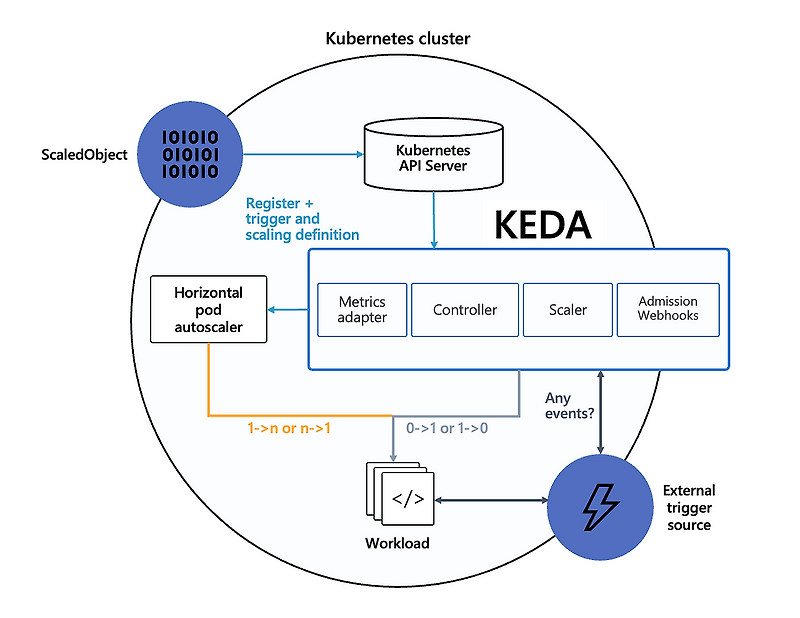
This is the key flow image for understanding Keda. The most important part is that Keda is responsible for adjusting the replica count from 0->1 and 1->0, while HPA handles the rest. You can find the details in the Keda docs.
The following is a yaml file that can make the pod replica count 0.
{{- if or (eq .Values.env "develop") (eq .Values.env "release") }}
apiVersion: keda.sh/v1alpha1
kind: ScaledObject
metadata:
  name: some-application-{{ .Values.env }}-scaledobject
  namespace: some-application
spec:
  scaleTargetRef:
    apiVersion: apps/v1
    kind: Deployment
    name: some-application-{{ .Values.env }}
  cooldownPeriod: 300
  minReplicaCount: 0
  maxReplicaCount: 10
  triggers:
    - type: cron
      metadata:
        timezone: Asia/Seoul
        start: "30 08 * * *"
        end: "30 19 * * *"
        desiredReplicas: "1"
    - type: memory
      metricType: Utilization
      metadata:
        value: "90"
{{- end }}
Operational Takeaway
It is not enough to say that KEDA enables replicas to reach zero. To operate it safely, one needs to know which scaler detects events, when HPA takes over again, and where minReplicas is enforced. Cost optimization has to be understood together with runtime semantics.
Because only development/release pods should scale to zero, it is convenient to declare the environment in templated values and branch from there.
The familiar HPA values appear here with slightly different names: minReplicaCount and maxReplicaCount. cooldownPeriod defines how long KEDA waits before scaling down after activity drops, giving the workload time to stabilize after sudden traffic or metric changes.
The trigger is the core of KEDA. KEDA supports many trigger types: CloudWatch log or metric signals, Prometheus custom metrics, cron schedules, queue depth, and more.
Since the initial goal was to scale the pod count to 0 at a specific time, I created a cron type trigger, set the pod count to 1 from 08:30 to 19:30, and did not declare it for other times.
I also added a memory type trigger. When multiple triggers exist like this, replicas are created according to the maximum value from each trigger calculation. (https://github.com/kedacore/keda/issues/5078)