On this page
Where the Problem Started
Database triggers are powerful, but dangerous. They run outside the application layer, which makes flow harder to see, and calling an external API from that point complicates failure propagation and transaction boundaries. This post records how the approach works and why it should be handled carefully.
In databases, triggers are often used for business needs such as maintaining data integrity and validation. When an operation such as INSERT or DELETE happens on a specific table, row, or column, the trigger is bound to the same transaction and performs additional work on top of the original operation.
But you can also attach an API call, something normally handled in the server application layer, to that flow.
The first thing to emphasize upfront is that this is absolutely not recommended. As mentioned earlier, the natural procedure is to call APIs from the controller and service layers alongside database operations executed by the application. There is no reason to create unpredictable database load by calling APIs from sensitive database work that needs to preserve ACID properties.
With that warning in mind, this post looks at how an API call can be attached to a database trigger, and what kind of load and coupling that creates. This belongs in the category of last-resort engineering: useful only when business constraints leave no cleaner option.
For the database, I used plain SQL Server 2019, and for analysis I used Datagrip.
Start with a table that has only a simple name column.
Implementation Path
CREATE TABLE BasicTable (
    id INT IDENTITY(1,1) PRIMARY KEY,
    name NVARCHAR(100) NOT NULL
);
GO
For the HTTP call, I used a public API that predicts age from a name parameter. When I passed in my own name, it returned a predicted age of 66.
How I Verified It

SQL Server requires an additional option before a trigger can call an external API directly:
EXEC sp_configure 'show advanced options', 1;
RECONFIGURE;
EXEC sp_configure 'Ole Automation Procedures', 1;
RECONFIGURE;
This option is for using OLE Automation Object inside Microsoft’s COM(Component Object Model), which is used only in MSSQL. Specifically, because we will use MSXML2.ServerXMLHTTP among the COM components for the current HTTP request, enabling this option is required. If you are wondering what OLE is, read https://en.wikipedia.org/wiki/Object_Linking_and_Embedding.
The rough procedures used to make the HTTP call and receive the response are as follows.
sp_OACreate: Creates an instance of an OLE Automation object.
sp_OADestroy: Destroys an instance of an OLE Automation object.
sp_OAGetProperty: Gets a property value of an OLE Automation object.
sp_OASetProperty: Sets a property value of an OLE Automation object.
sp_OAMethod: Calls a method of an OLE Automation object.
Create a separate table to log what the trigger does.
CREATE TABLE ApiResponseLog (
    id INT IDENTITY(1,1) PRIMARY KEY,
    operation_type NVARCHAR(10),
    name NVARCHAR(100),
    response NVARCHAR(1000),
    timestamp DATETIME DEFAULT CURRENT_TIMESTAMP
);
GO
I will insert the operation_type (UPDATE, SELECT, INSERT, DELETE), the name to be passed to the API, and the corresponding response.
But for performance testing, I also wanted to record the API call time, DB insert time, and so on.
ALTER TABLE ApiResponseLog
ADD api_call_start_time DATETIME2,
    api_call_end_time DATETIME2,
    api_call_duration_ms INT,
    insert_start_time DATETIME2,
    insert_end_time DATETIME2,
    insert_duration_ms INT;
GO
The trigger itself looks like this.
CREATE TRIGGER trgAfterAllOperations ON BasicTable
AFTER INSERT, UPDATE, DELETE
AS
BEGIN
    DECLARE @name NVARCHAR(100);
    DECLARE @url NVARCHAR(200);
    DECLARE @response NVARCHAR(1000);
    DECLARE @object INT;
    DECLARE @status INT;
    DECLARE @operation_type NVARCHAR(10);
    DECLARE @api_call_start_time DATETIME2;
    DECLARE @api_call_end_time DATETIME2;
    DECLARE @insert_start_time DATETIME2;
    DECLARE @insert_end_time DATETIME2;

    -- operation type 결정
    -- update 의 경우 delete/insert pseudotable 모두에 행이 생성됨
    IF EXISTS (SELECT * FROM inserted) AND EXISTS (SELECT * FROM deleted)
        SET @operation_type = 'UPDATE';
    ELSE IF EXISTS (SELECT * FROM inserted)
        SET @operation_type = 'INSERT';
    ELSE IF EXISTS (SELECT * FROM deleted)
        SET @operation_type = 'DELETE';

    IF @operation_type = 'INSERT' OR @operation_type = 'UPDATE'
    BEGIN
        SELECT TOP 1 @name = name FROM inserted;
    END
    ELSE IF @operation_type = 'DELETE'
    BEGIN
        SELECT TOP 1 @name = name FROM deleted;
    END

    -- API URL 지정
    SET @url = 'https://api.agify.io?name=' + @name;

    -- API call 시작시간 기록
    SET @api_call_start_time = SYSDATETIME();

    -- API call!!
    EXEC @status = sp_OACreate 'MSXML2.ServerXMLHTTP', @object OUT;
    IF @status = 0 EXEC @status = sp_OAMethod @object, 'open', NULL, 'GET', @url, 'false';
    IF @status = 0 EXEC @status = sp_OAMethod @object, 'send';
    IF @status = 0 EXEC @status = sp_OAGetProperty @object, 'responseText', @response OUT;
    IF @status = 0 EXEC sp_OADestroy @object;

    -- API call 끝난시간 기록
    SET @api_call_end_time = SYSDATETIME();

    -- insert 시작시간 기록
    SET @insert_start_time = SYSDATETIME();

    -- 트리거 로깅
    INSERT INTO ApiResponseLog (
        operation_type,
        name,
        response,
        api_call_start_time,
        api_call_end_time,
        api_call_duration_ms,
        insert_start_time,
        insert_end_time,
        insert_duration_ms
    )
    VALUES (
        @operation_type,
        @name,
        @response,
        @api_call_start_time,
        @api_call_end_time,
        DATEDIFF(MILLISECOND, @api_call_start_time, @api_call_end_time),
        @insert_start_time,
        SYSDATETIME(), -- insert 끝난시간 기록
        DATEDIFF(MILLISECOND, @insert_start_time, SYSDATETIME())
    );
END;
GO
The snippet is long, but the important part is that the HTTP request is executed inside the trigger’s transaction path.
After creating the trigger, modify BasicTable.

Execute the change.

The result confirms that the API call ran and that the response was saved.
The key column is api_call_duration_ms. It records 222ms, which is ordinary for a server-to-server API call. The problem is that the time is now inside a database transaction. In contrast, insert_duration_ms is recorded at a sub-millisecond scale.
A single operation that should remain integral now has meaningful time consumption because the trigger makes an API call.
Then I checked the database load.
-- Insert 20 records
INSERT INTO BasicTable (name) VALUES ('Name1');
INSERT INTO BasicTable (name) VALUES ('Name2');
INSERT INTO BasicTable (name) VALUES ('Name3');
INSERT INTO BasicTable (name) VALUES ('Name4');
INSERT INTO BasicTable (name) VALUES ('Name5');
INSERT INTO BasicTable (name) VALUES ('Name6');
INSERT INTO BasicTable (name) VALUES ('Name7');
INSERT INTO BasicTable (name) VALUES ('Name8');
INSERT INTO BasicTable (name) VALUES ('Name9');
INSERT INTO BasicTable (name) VALUES ('Name10');
INSERT INTO BasicTable (name) VALUES ('Name11');
INSERT INTO BasicTable (name) VALUES ('Name12');
INSERT INTO BasicTable (name) VALUES ('Name13');
INSERT INTO BasicTable (name) VALUES ('Name14');
INSERT INTO BasicTable (name) VALUES ('Name15');
INSERT INTO BasicTable (name) VALUES ('Name16');
INSERT INTO BasicTable (name) VALUES ('Name17');
INSERT INTO BasicTable (name) VALUES ('Name18');
INSERT INTO BasicTable (name) VALUES ('Name19');
INSERT INTO BasicTable (name) VALUES ('Name20');

-- Update 15 records
UPDATE BasicTable SET name = 'UpdatedName1' WHERE id = 1;
UPDATE BasicTable SET name = 'UpdatedName2' WHERE id = 2;
UPDATE BasicTable SET name = 'UpdatedName3' WHERE id = 3;
UPDATE BasicTable SET name = 'UpdatedName4' WHERE id = 4;
UPDATE BasicTable SET name = 'UpdatedName5' WHERE id = 5;
UPDATE BasicTable SET name = 'UpdatedName6' WHERE id = 6;
UPDATE BasicTable SET name = 'UpdatedName7' WHERE id = 7;
UPDATE BasicTable SET name = 'UpdatedName8' WHERE id = 8;
UPDATE BasicTable SET name = 'UpdatedName9' WHERE id = 9;
UPDATE BasicTable SET name = 'UpdatedName10' WHERE id = 10;
UPDATE BasicTable SET name = 'UpdatedName11' WHERE id = 11;
UPDATE BasicTable SET name = 'UpdatedName12' WHERE id = 12;
UPDATE BasicTable SET name = 'UpdatedName13' WHERE id = 13;
UPDATE BasicTable SET name = 'UpdatedName14' WHERE id = 14;
UPDATE BasicTable SET name = 'UpdatedName15' WHERE id = 15;

-- Delete 15 records
DELETE FROM BasicTable WHERE id = 1;
DELETE FROM BasicTable WHERE id = 2;
DELETE FROM BasicTable WHERE id = 3;
DELETE FROM BasicTable WHERE id = 4;
DELETE FROM BasicTable WHERE id = 5;
DELETE FROM BasicTable WHERE id = 6;
DELETE FROM BasicTable WHERE id = 7;
DELETE FROM BasicTable WHERE id = 8;
DELETE FROM BasicTable WHERE id = 9;
DELETE FROM BasicTable WHERE id = 10;
DELETE FROM BasicTable WHERE id = 11;
DELETE FROM BasicTable WHERE id = 12;
DELETE FROM BasicTable WHERE id = 13;
DELETE FROM BasicTable WHERE id = 14;
DELETE FROM BasicTable WHERE id = 15;
First, remove the trigger and run the test without it.
[2024-06-02 07:23:53] 50 rows affected in 26 ms
The run completed 20 inserts, 15 updates, and 15 deletes in about 0.02 seconds. Looking more closely:

For insert, the plan shows the cost and actual execution time of the clustered index insert.
Then enable the trigger and run the benchmark again.
        INSERT INTO BasicTable (name) VALUES ('Name28');
        INSERT INTO BasicTable (name) VALUES ('Name29');
        INSERT INTO BasicTable (name) VALUES ('Name30');
        INSERT INTO BasicTable (name) VALUES ('Name31');
        INSERT INTO BasicTable (name) VALUES ('Name32');
        INSERT INTO BasicTable (name) VALUES ('Name33');
        INSERT INTO BasicTable (name) VALUES ('Name34');
        INSERT INTO BasicTable (name) VALUES ('Name35');
        INSERT INTO BasicTable (name) VALUES ('Name36');
        INSERT INTO BasicTable (name) VALUES ('Name37');
        INSERT INTO BasicTable (name) VALUES ('Name38');
        INSERT INTO BasicTable (name) VALUES ('Name39');
        INSERT INTO BasicTable (name) VALUES ('Name40');
        INSERT INTO BasicTable (name) VALUES ('Name41');
        INSERT INTO BasicTable (name) VALUES ('Name42');
        INSERT INTO BasicTable (name) VALUES ('Name43');
        INSERT INTO BasicTable (name) VALUES ('Name44');
        INSERT INTO BasicTable (name) VALUES ('Name45');
        INSERT INTO BasicTable (name) VALUES ('Name46');
        INSERT INTO BasicTable (name) VALUES ('Name47');
[2024-06-02 07:33:20] 20 rows affected in 4 s 894 ms
master> -- Update 15 records
        UPDATE BasicTable SET name = 'UpdatedName28' WHERE id = 28;
        UPDATE BasicTable SET name = 'UpdatedName29' WHERE id = 29;
        UPDATE BasicTable SET name = 'UpdatedName30' WHERE id = 30;
        UPDATE BasicTable SET name = 'UpdatedName31' WHERE id = 31;
        UPDATE BasicTable SET name = 'UpdatedName32' WHERE id = 32;
        UPDATE BasicTable SET name = 'UpdatedName33' WHERE id = 33;
        UPDATE BasicTable SET name = 'UpdatedName34' WHERE id = 34;
        UPDATE BasicTable SET name = 'UpdatedName35' WHERE id = 35;
        UPDATE BasicTable SET name = 'UpdatedName36' WHERE id = 36;
        UPDATE BasicTable SET name = 'UpdatedName37' WHERE id = 37;
        UPDATE BasicTable SET name = 'UpdatedName38' WHERE id = 38;
        UPDATE BasicTable SET name = 'UpdatedName39' WHERE id = 39;
        UPDATE BasicTable SET name = 'UpdatedName40' WHERE id = 40;
        UPDATE BasicTable SET name = 'UpdatedName41' WHERE id = 41;
        UPDATE BasicTable SET name = 'UpdatedName42' WHERE id = 42;
[2024-06-02 07:33:23] 15 rows affected in 3 s 642 ms
master> -- Delete 15 records
        DELETE FROM BasicTable WHERE id = 28;
        DELETE FROM BasicTable WHERE id = 29;
        DELETE FROM BasicTable WHERE id = 30;
        DELETE FROM BasicTable WHERE id = 31;
        DELETE FROM BasicTable WHERE id = 32;
        DELETE FROM BasicTable WHERE id = 33;
        DELETE FROM BasicTable WHERE id = 34;
        DELETE FROM BasicTable WHERE id = 35;
        DELETE FROM BasicTable WHERE id = 36;
        DELETE FROM BasicTable WHERE id = 37;
        DELETE FROM BasicTable WHERE id = 38;
        DELETE FROM BasicTable WHERE id = 39;
        DELETE FROM BasicTable WHERE id = 40;
        DELETE FROM BasicTable WHERE id = 41;
        DELETE FROM BasicTable WHERE id = 42;
[2024-06-02 07:33:26] 15 rows affected in 3 s 91 ms
The trigger-backed run took 4.892s for 20 INSERTs, 3.642s for 15 UPDATEs, and 3.091s for 15 DELETEs, for a total of around 11 seconds. That result is exactly what should be expected once API calls are tied to trigger execution.
Then were the API calls and inserts into the ApiResponseLog table performed correctly?
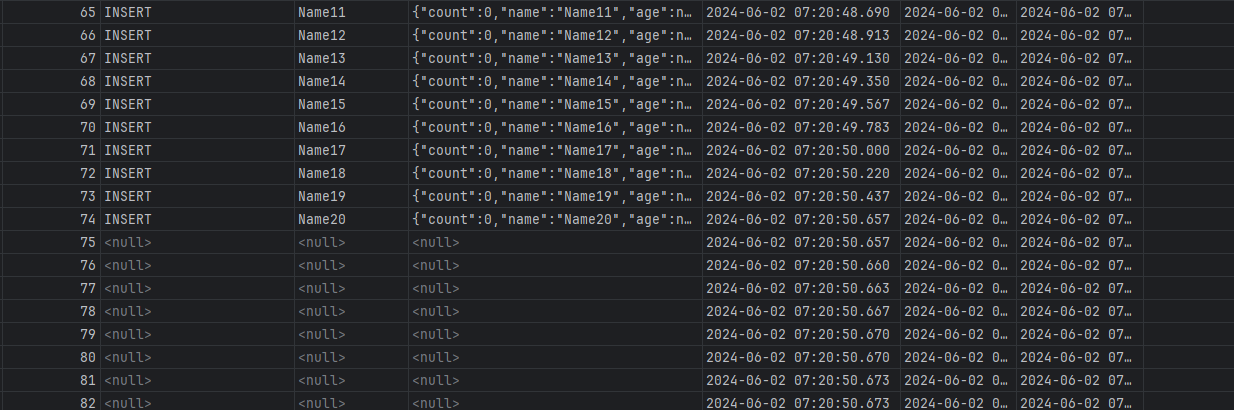
Unfortunately, no.
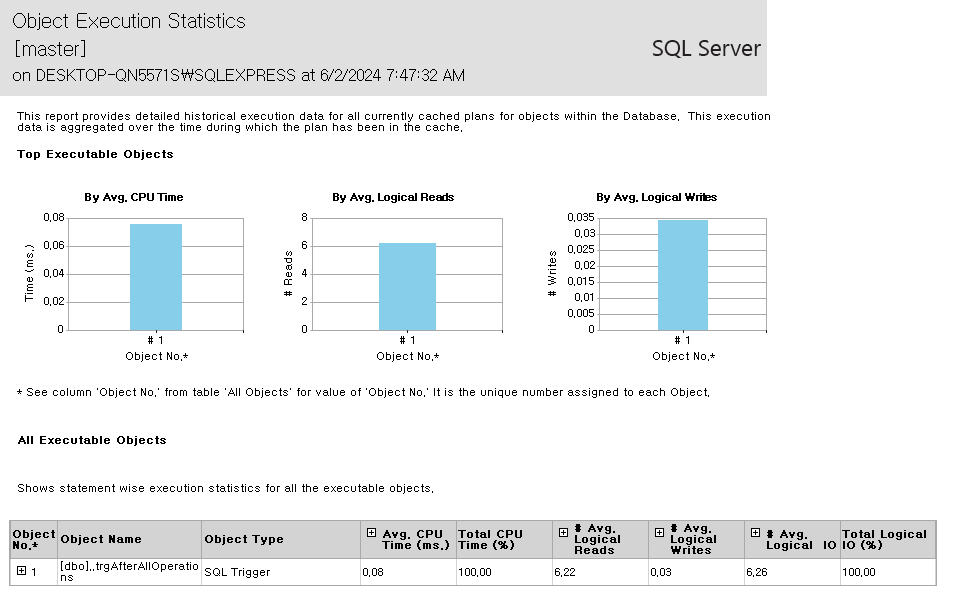
After going into SSMS, I observed that the SQL trigger was consuming CPU time. As this accumulates, concurrency seems to spike, and some objects apparently fail to be delivered properly.
Not only that, but if the server does not deliver the API response in a normal amount of time, the transaction can also blow up after reaching the Trigger execution limit. This can create bottlenecks or locks, and even if the transaction passes through with a silent throw, the desired API response was never received, so the logic still failed to achieve its goal.
In conclusion, do not ruin the operation that should be the lightest by attaching API calls to triggers in a database where you have worked so hard to reduce latency. Even if the API call is light enough to ignore, the server making the API call and the server running the database are different, so a dependency is inevitable.
API calls inside triggers also damage the atomicity of the transaction. External calls cannot become part of database transaction management.
Also, if an error occurs, debugging hell will open up. You might not be able to debug it at all.
Unless it is really, really, really necessary for the business logic, do not use it. Just do not use it.

Design Conclusion
Trigger-based API calls can look like a fast workaround. But once ownership moves into the database, observability, retry behavior, rollback semantics, and testability all become harder. It can be used, but only when there is a clear reason not to use application events or an outbox-style design instead.