orchestrator stack이 생긴 뒤, 다음 질문은 이 시스템이 live cluster와 맞닿아도 버틸 수 있는가였다. synthetic trace는 통제할 수 있기 때문에 유용하다. 동시에 system이 실제보다 더 coherent해 보이게 만들 수 있기 때문에 위험하다.
나는 dashboard가 준비된 dataset row를 replay하는 데 그치지 않고 Kubernetes state에 반응하길 원했다. 그러려면 반복 가능한 exercise를 위한 synthetic path는 유지하되, cluster metric을 읽고, 불완전한 timing을 드러내고, controller가 매 순간 무엇을 믿고 있는지 보여주는 live path가 필요했다.
이 단계는 기능을 더 붙이는 일이라기보다 연출을 줄이는 일이었다. 살아 움직이는 것처럼 보이는 system만으로는 충분하지 않았다. UI는 live data가 어디에서 들어오고, 어디에서 비어 있으며, controller가 어디에서 아직 assumption에 기대고 있는지 보여줘야 했다.
Live loop
Live loop는 control-plane 조각들이 하나로 맞물리는 지점이었다. Kubernetes snapshot을 수집하고, Observation을 만들고, 각 agent에게 proposal을 요청한 뒤, referee를 통해 proposal을 resolve하고, decision을 내보내고, backend를 한 step 진행하고, reward state를 갱신한 다음, dashboard state file을 쓴다.
proposals = [agent.act(obs) for agent in agents]
action = resolve(proposals)
reason = _decision_reason(snapshot, action.agent_name, action.kind.value)
action_label = _action_label(action)

decision_payload = {
    "agent": action.agent_name,
    "kind": action.kind.value,
    "target": action.target,
    "payload": dict(action.payload),
    "action_label": action_label,
    "score": float(action.score),
    "proposal_count": len(proposals),
    "proposals": [
        {"agent": p.agent_name, "kind": p.kind.value, "target": p.target, "score": float(p.score)}
        for p in proposals
    ],
}

state.decision(decision_payload)
여기서 내가 신경 쓴 디테일은 proposal list였다. 최종 action만 보여주는 dashboard는 충돌을 숨긴다. 최종 action이 AgentA:replicate라고 해도, 나는 AgentB와 AgentC가 무엇을 원했는지 여전히 알고 싶다. 그래야 system이 차분하게 같은 방향을 보고 있었는지, 아니면 safety가 모든 것을 덮어쓴 것인지 구분할 수 있다.
Live Kubernetes path 실행하기
Local run command는 길어졌다. Loop를 명시적으로 드러내고 싶었기 때문이다. 어떤 config를 쓰는지, event directory는 어디인지, kubeconfig는 무엇인지, 얼마나 자주 sample할지, tuning을 할지 건너뛸지, exercise stimulus를 적용할지까지 모두 command에 드러나야 했다.
PYTHONPATH=orchestrator_stack .venv/bin/python orchestrator_stack/run.py live-kubernetes-run --config orchestrator_stack/config/orchestrator.example.json --event-dir orchestrator_stack/runtime/visualization-experimental --kubeconfig "$HOME/Documents/borg_orchestrator_clusters/kubeconfig-experimental" --interval-seconds 3 --max-iterations 5 --namespace-prefixes borg-orchestrator-exercise,borg-comparison-workload,default,test- --trace-out orchestrator_stack/runtime/visualization-experimental/live_kubernetes_trace.json --trials 3 --prometheus-base-url http://127.0.0.1:19090 --no-policy --no-tune --exercise-cluster --exercise-namespace borg-orchestrator-exercise --exercise-interval-iterations 1 --exercise-randomize --exercise-seed 31나는 tuning을 끈 fast mode로 자주 실행했다. Policy training을 기다리지 않고 live behavior를 debug하고 싶었기 때문이다. 그래서 일부 dashboard capture에서는 Ray와 Optuna가 disabled로 나온다. Dashboard bug가 아니었다. 활발하게 변하는 Kubernetes 상태를 빠르게 보기 위해 내가 선택한 run mode였다.
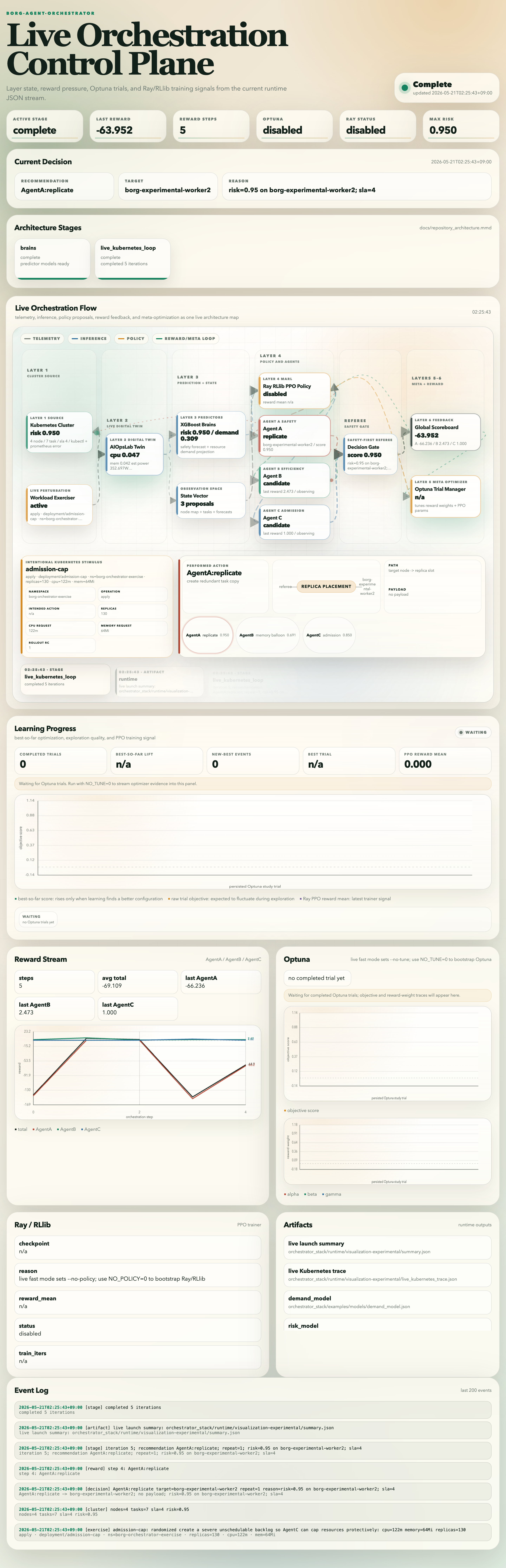
전체 dashboard가 보여준 것
전체 dashboard는 내가 말하고 싶었던 이야기와 system이 실제로 만들고 있던 상태 사이의 mismatch를 잡는 데 도움이 됐다. Active stage가 complete인데 event log에 cluster sample이 없다면 무언가 잘못된 것이다. Reward는 변했는데 decision이 변하지 않는다면 backend를 들여다봐야 했다. Exerciser는 active인데 queue pressure가 그대로라면 Kubernetes stimulus가 내가 생각한 대로 동작하지 않았을 가능성이 컸다.
Capture된 run에서 event sequence는 하나의 static recommendation으로 보이지 않는다. Risk와 SLA 상태가 변하면서 AgentA replicate, AgentB memory balloon proposal, AgentC admission/deprioritize behavior를 거쳐 다시 AgentA replicate로 이동한다. 내가 원했던 liveness는 이런 것이었다. 그 자체로 보기 좋은 animation이 아니라, 추적 가능한 state change였다.
Live data에서 드러난 현실적인 문제들
Live Kubernetes data는 지루하지만 현실적인 문제들을 끌고 왔다. Metrics Server는 lag가 있을 수 있다. Prometheus port-forward는 실패할 수 있다. Kind cluster는 EKS와 다르게 동작할 수 있다. Pending pod는 일부러 unschedulable node selector를 둔 결과일 수도 있고, resource pressure 때문일 수도 있고, controller 선택 때문일 수도 있다. 나는 dashboard가 이런 case를 하나의 score로 납작하게 만들지 않고, 해석할 수 있을 만큼 충분한 detail을 드러내길 원했다.
그래서 dashboard는 raw에 가까운 cluster state와 해석된 decision state를 둘 다 유지했다. Raw state는 Kubernetes가 무엇을 보여주는지 말해준다. Decision state는 orchestrator가 무엇을 해야 한다고 판단하는지 말해준다. 흥미로운 debugging은 이 둘이 어긋날 때 시작된다.
이 단계가 남긴 것
이 단계가 끝날 무렵에는 local Kubernetes loop를 따라갈 수 있는 live experimental dashboard가 생겼다. 아직 공정한 baseline comparison은 아니었다. 하지만 이 프로젝트가 batch experiment가 아니라 control system처럼 느껴진 것은 이때가 처음이었다.
live path는 프로젝트를 설명하기 어렵게 만들었지만, 믿기는 더 쉽게 만들었다. 지저분한 timing, missing signal, 다루기 까다로운 state transition이 들어왔고, 바로 그래서 의미가 있었다. 실제 system은 깨끗한 실험실 조건에서만 스스로를 검증하지 않는다.